第1~8章 基础
第一章,javascript的组成
- ECMAScript
- DOM(W3C标准)
- BOM(不同浏览器实现有些有所不同,趋于标准中)
第二章,HTML中的javascript
标签中不能直接出现字符串是还未结束标签,如</script>,</html>
必须要转义<\/script>,<\/html>
- 常见属性
- async:异步加载外部 js 引用,多个 async 的 script 标签不一定会按书写顺序执行
- defer:异步加载外部 js 引用,多个 defer 的 script 标签会严格按照书写顺序执行
- src:获取外部 js 代码的 url ,允许获取不同域内容
- crossorigin:配置相关请求的 cors 设置
- anonymous:请求携带用户凭据:Cookie
- use-credentials:请求不携带用户凭据:Cookie
- integrity:允许比对接收收到的资源和指定加密签名以验证字资源的完整性
- 比如一些静态资源,有可能被篡改,此时可以预先填写 hash 值来确认是不是我预料之中的资源
- charset:指定字符代码集
- type:表示代码块中的脚本语言类型(MIME类型)(值为 module 默认为异步模块)
更多MDN: https://developer.mozilla.org/zh-CN/docs/Web/HTML/Element/script#%E5%B1%9E%E6%80%A7
<noscript></noscript>
在不支持 js 的浏览器和禁止渲染 js 时才会渲染标签内内容
第三章,语言基础
散碎
- 严格模式
"use strict" //全局严格模式
function fun () {
  "use strict" // 局部严格模式
}

1. 禁止全局变量
在严格模式下,赋值给一个未声明的变量将导致错误。

2. 消除this的隐式绑定
在严格模式下,this 不会被默认绑定到全局对象。this 将是 undefined。

3. 禁止重复的参数名称

4. 禁止八进制字面量
010 ❌ ; 0o10 ✔

5. 禁止with语句

6. 禁止删除不可删除的属性

7. 限制eval
在严格模式下,eval不允许在其创建的作用域外声明变量。
eval("var x = 2");
console.log(x); // ReferenceError: x is not defined

8. 全局对象属性
严格模式下,试图赋值给只读属性或不可扩展对象的属性会抛出错误。

9. 新的保留字
严格模式下,一些新的保留字不能用作变量名。
- 关键字 with:非常不建议使用,会造成数据泄露,此内容作了解即可
let obj = { a: 1 }
function fun () {
	with (obj) {
		a = 2
		b = 2
	}
}
fun()
console.log(obj) //{a:2}
console.log(b) //2
- with 原理:LHS & RHS 搜索
- LHS:如果需要对变量赋值,并不关心变量原来的值;比如
a = 2,此处 a 用到 LHS 查询
- RHS:如果需要获取到变量的值;比如
let c = a,此处 a 用到 RHS 查询
当在严格模式下,LHS 和 RHS 失败都会抛出 ReferenceError 错误;非严格模式下 LHS 搜索会自动创建一个隐式全局变量,且标识符为 LHS 引用目标
声明 var 与 let
- var 为函数作用域,let为块作用域
- 暂时性死区:var 会有变量提升
function fun () {
  console.log(a) //undefined
  // 在作用域中用var,相当与在作用域最开始就会执行 var a
  //再到此语句才会执行 a = 0
  var a = 0
  console.log(a) // 0
}
function fun1 () {
  console.log(a) //报错
  let a = 0  // 定义及赋值都发生在此处
}
- 冗余声明:var 可以重复声明相同变量名(js解析引擎会自动将所有同级提升至顶部合成一次声明),let 不行
- 全局下用 var 声明的变量会变成 window 的属性
- 不用 关键字 声明直接赋值,没有变量提升,不管怎样都会会成为全局属性 (严格模式不能这样写,平时也不建议这样写)
x = 1
console.log(window.x) // 1
console.log(window.y) // 报错
y = 2
- 循环中的 var 与 let
- for 循环中的 () 中的 var 声明变量会泄露至全局;let 则不会
for (var i = 0; i < 5; i++) {
  //code...
}
console.log(i) // 5

for (let j = 0; j < 5; j++) {
  //code...
}
console.log(j) // undefined
//按照期望我们希望他输出0 1 2 3 4
//原因在于每次输出的i都是同一个变量,且输出操作是在循环遍历完成后再执行的
//即执行超时变量
for (var i = 0; i < 5; i++) {
  setTimeout(() => { console.log(i) }, 0) //5 5 5 5 5
}

/*
	两种解决方案
  	1.闭包
  	2.使用 let 声明迭代变量
*/
//闭包
for (var i = 0; i < 5; i++) {
	(function (i) {
		setTimeout(() => { console.log(i) }, 0) //0 1 2 3 4
	})(i)
}
//let
for (let i = 0; i < 5; i++) {
	setTimeout(() => { console.log(i) }, 0) //0 1 2 3 4
}
闭包与 let 能解决此类问题原理
- 闭包:用一个立即执行函数将所要执行的代码包裹起来将当前的迭代变量(此时变量还是正确形式)作为参数传入给函数,函数内部的参数就会被赋值,而这两个参数现在是互不影响的,而且所要执行的代码引用的是函数内部的参数,即正确的值(闭包值)。
- let:用 let 声明迭代变量,js 引擎会在后台为每一个迭代循环生成一个新的迭代变量,所以我们所要执行的异步代码引用的都是不同的变量实例。
const
- 声明时必须初始化
- 赋值后不可修改
- 不允许冗余声明
- 为块级作用域
- const 的限制只适用于它指向的变量的引用;换句话说就是当 const 声明一个对象时,那么只要引用不变,就不会报错,可以修改对象的属性
- 浅谈 const 在 for-in 与 for-of 中与 for循环中的区别
/*
	首先因该明确的是:
    在 for 循环中不能使用 const 声明迭代变量
    在 for-in 与 for-of 中建议使用 const
*/
for (const key in {a: 1, b: 2}) {
  console.log(key) //a b
}
for (const key of [1, 2]) {
  console.log(key) //1 2
}
// for-in 与 for-of 是严格迭代模式
// 这就意味着每次循环 js 引擎都会单独创建一个块级作用域来完成每个变量的行为
// 而在 for 循环中始终是同一个块级作用域
- 避免使用 var
- const 主,let 次之
数据类型
4.1 概要
7 种原始数据类型:Undefined,Null,Number,String,Boolean,Symbol,BigInt
1 种复杂类型:Object
4.2 区分类型操作符:typeof
- typeof null;会返回 "object"(因为 null 被认定为是空对象的引用)
4.3 undefined 与 null
- undefined:声明了但是未赋初值的变量都会是这个值(不建议赋值,因为意义不大)
- null:空对象的引用(建议在声明一个对象且不知道此对象具体引用时赋初值 null,与 undefined 区分开来)
if (undefined || null) {/* 不会执行 */}
console.log(undefined == null) // true
console.log(undefined === null) // false
- 未声明的变量只能执行一个有用的操作 typeof;不然都会报错(非严格模式下可以执行delete)
4.4 Boolean
- Boolean(option); 转换参数转为布尔值
- 转换为 false 的值有:null,undefined,"",0,false,NaN
4.5 Number
- 一些特异行为
// 建议使用 parseInt 或者 parseFloat
Number(undefined) // NaN
Number(null) // 0

+0 === -0 // true
4.5 string
- 字符字面量
- ','',······
- \xnn:以十六进制编码代表的字符;\x41 代表 "A"
- \unnnn:以十六进制编码代表的 unicode 字符;\u03a3 代表 "Σ"
一个字符字面量长度为 1
- 特点:可以以下标形式访问,但是不能以下标形式修改
let s = 'hello world'
console.log(s[0]) // h
s[0] = 'a' // 报错
- 转换为字符串
toString():当传入参数是原始类型,那么实际执行的 toString 的是创建的临时包装类型
String():由于 undefined 和 null 无包装类型,所以无法使用 toString,可以用 String 进行转换
- 模板字符串
原理是调用插入的对象的 toString 方法(null undefined 直接返回字符串形式),将返回值与字符串进行拼接(symbol 不能用在模板字符串和隐式转换,下面会有解释)
const number = 1;
const boolean = true;
const symbol = Symbol();
const bigint = BigInt("10000");
const string = "xx";
const obj = {
  toString() {
    return "obj-toString";
  },
};
Number.prototype.toString = function () {
  return "Number-toString";
};
Boolean.prototype.toString = function () {
  return "Boolean-toString";
};
Symbol.prototype.toString = function () {
  return "Symbol-toString";
};
BigInt.prototype.toString = function () {
  return "BigInt-toString";
};
Object.prototype.toString = function () {
  return "Object-toString";
};
console.log(
  `${number}__${boolean}__${bigint}__${string}__${obj}__${null}__${undefined}`
); // 1__true__10000__xx__obj-toString__null__undefined
console.log(symbol.toString()); // Symbol-toString
console.log(symbol + ""); // TypeError: Cannot convert a Symbol value to a string
为什么 symbol 无法使用隐式转化和模板字符串 https://developer.mozilla.org/zh-CN/docs/Web/JavaScript/Reference/Global_Objects/Symbol/toPrimitive;文档中@@toPrimitive 是Symbol.toPrimitive 的简写形式
 简单来说就是,官方有意禁止此操作
这里有些没有命中他们自己原型的toString,因为隐式转换优先命中@@toPrimitive
这里说一下关于 对象 { } 的 toString() 为何返回的是 [object Object];([对象类型 构造函数])
在底层代码中,对象的 toString() 返回的是对象类型的字符串,(这对判断类型很有用,比 typeof 有用)
function fun(){
  //code...
}
let n = 0
console.log(Object.prototype.toString.call(fun)) // [object Function]
console.log(Object.prototype.toString.call(n)) // [object Number]
- 模板字符串标签函数
let x = 1
let y = 3
let z = 2
function fun (strings, ...options) {
	console.log(strings, '\n', options)
}
fun`${x} + ${y} - ${z} = ${x + y - z}`
// [ '', ' + ', ' - ', ' = ', '' ]
// [ 1, 3, 2, 2 ]
strings 是依照插值语法分割成的字符串数组
options 则是所有插值语法结果值组成的数组
- 原始字符串
当模板字符串中带有转义字符或 uncode 等代码时,如何获取到他的原始字符串
/* 默认标签函数String.raw */
console.log(String.raw`A\nB`) // A\nB

/* 对于本来就是换行的字符串不行 */
console.log(String.raw`A
B`)
//A
//B

/* 标签函数第一个参数会自动加上一个 raw 属性 */
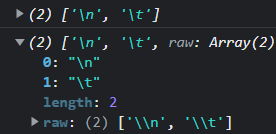
function getRawStr (strings) {
  console.log(['\n', '\t'])
  console.log(strings)
}
getRawStr`\n${'-'}\t`
4.6 Symbol (TODO:没看完)
- 基础使用
const sy = Symbol('description')
console.log(sy) // Symbol('description')
注意事项
- 原始类型,唯一,不可变
- 无字面量语法
- 不能 new
- 全局符号注册表 Symbol.for('description')
- 此方法返回一个符号类型,如果全局符号表中有此描述符所描述的符号,则返回此符号;如果全局符号表中没有则创建一个新符号并放入全局符号注册表并返回
- 此方法底层执行幂等操作
- 描述符必须要是字符串如果不是字符串会将其装换为字符串
let Sy = Symbol.for('foo'); // 创建新符号
let otherSy = Symbol.for('foo'); // 重用已有符号
console.log(Sy === otherSy); // true

let emptyGlobalSymbol = Symbol.for();
console.log(emptyGlobalSymbol); // Symbol(undefined)
- Symbol.keyFor() 接收符号为参数,返回全局符号注册表中此符号的描述,如果全局符号注册表中没有则返回 undefined
let s1 = Symbol('bar') // 创建普通符号
let s2 = Symbol('bar2') // 创建全局符号
console.log(Symbol.keyFor(s1)) // undefined
console.log(Symbol.keyFor(s2)) // bar
//如果传给 Symbol.keyFor()的不是符号,则该方法抛出 TypeError:
Symbol.keyFor(123) // TypeError: 123 is not a symbol
4.7 Object (后面详细讲)

操作符
-- ++ + - === 等
5.2 操作符的隐式转换
const arr = [2]
arr.valueOf = function () {
  console.log('valueOf @@@')
  return Array.prototype.valueOf.call(arr) // [2]
}
arr.toString = function () {
  console.log('toString @@@')
  return Array.prototype.toString.call(arr) // '2'
}
console.log(arr > 0)
// valueOf @@@
// toString @@@
//这里中间还执行了 Number(arr)
// true
5.3 一元 + 与 -
+与 Number() 无异,- 则是 Number() 后取负
5.4 ~ 与 ^
~ : 位取反
^ : 位同为 0 ,异为 1
5.5 >> 与 >>> 与 <<
- << >>:有符号移位
>>> : 无符号右移: 符号位脱离表示数值
5.6 || 与 &&
- 将操作数隐式转换
- 表达式返回操作数,并不是返回布尔值
- || 返回第一个真值,否则返回最后一个
- && 返回第一个假值,否则返回最后一个
null || null // null
null && null // null
true && null // null
5.7 * 与 / 与 + 与 - 与 === 与 !== 与 == 与 !=
// 没展示出来的要么我不知道,要么就是正常思维
Infinity * 0 			// NaN
-Infinity * 0 		// NaN
Infinity - Infinity // NaN
-Infinity + Infinity // NaN
Infinity / Infinity,  // NaN
0 / 0,                // NaN
3 / 0                 // Infinity

Infinity + -Infinity  // NaN

+0 - -0 	 // -0
-0 - -0 	 // +0
-0 + -0 	 // -0
-0 + +0 	 // +0
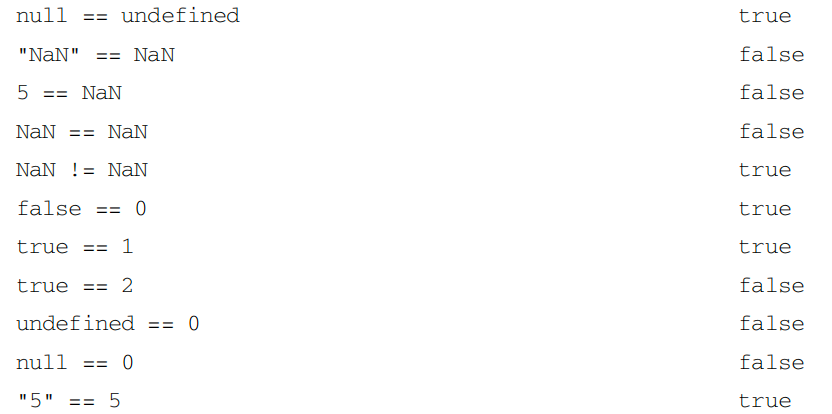
null 与 undefined 不会进行类型转换,但是 null == undefined
NaN == NaN 不会调用 Number(NaN)
语句
for in 与 for of 与 for await of
for in 用于枚举对象,包括对象(只能是非符号属性(symbol))
for of 用于可迭代对象,拿到的值为为可迭代对象的 next() 所得的 value 值

function getPromise(data, delay) {
  return new Promise((resolve, reject) => {
    setTimeout(() => {
      resolve(data)
    }, delay)
  })
}

const asyncArr = [
  [30, 3000],
  [20, 2000],
  [10, 1000]
]

let  i = 0
;(async function () {
  for await (const data of asyncArr.map(item => getPromise(item[0], item[1]))) {
		console.log(data)
  }
})()
// 30 20 10
for await 其实请求是同时发起的,但是得到数据按照顺序遍历顺序来的
标签语句 与 with (这两货都不建议使用)
// 可跳出多层循环
label:
for(...){
  for(...){
    break label
  }
}

// 可跳出内部循环
label:
for(...){
  for(...){
    continue label
  }
}

//with
const store = {
    a: 1,
}
const a = 33
const b = 44
let x, y, z

with(store){
    x = a
    y = b
}
console.log(x, y)
// 1 44
严格模式直接就用不了 with
switch
一句话:条件可以是 变量 或 语句 或 任何值,且比较逻辑为全等;不支持 continue
函数
严格模式下:参数名不能叫 arguments 或 eval
第四章,变量、作用域与内存
散碎
动态属性
const a = 1
const b = new Object(1)
a.name = 'test'
b.name = 'test'
console.log(a, b) // undefined test
动态属性的添加有效率问题,每个相同结构的对象共享一个隐藏类(里面记录了各个键的地址距离)
如果事先未声明有哪些属性,后添加或 delete,会导致不再共享隐藏类,转而再创建一个隐藏类
typeof
console.log(
  typeof 0,                     // number ⭐️
  typeof 'A',                   // string ⭐️
  typeof true,                  // boolean ⭐️
  typeof undefined,             // undefined ⭐️
  typeof Symbol(),              // symbol ⭐️
  typeof null,                  // object
  typeof new Array(),           // object
  typeof new Object(),          // object
  typeof new Function(),        // function ⭐️
  typeof (() => {}),            // function ⭐️
  typeof new RegExp(),          // object --ie 与 fireFox 中会返回 object, safari5,chrome7 返回 function;只要实现了内部方法 [[call]] 规定返回 function
  typeof new Date()             // object
)
// 可用于原始值与函数
执行上下文,作用域,作用域链,词法环境,变量环境
书中所述变量对象、活动对象概念已是ES3的东西了,目前是词法环境、变量环境的概念
详细理解:https://juejin.cn/post/6844903682283143181
垃圾回收
这篇文章从浅到深,依次递进垃圾回收的过程及演变,比书中的流程更加清晰
https://juejin.cn/post/6981588276356317214?searchId=202407102349297939C020BADFCE604854
第五章,基本引用类型
Date

原始值包装类型
const s = 'xu'
const res = s.substring(2) // 按理来说原始值并没有属性,所以不能有substring

//内部处理,实际上 const res = s.substring(2) 等价于:
// const temp = new String('xu')
// res = temp.substring(2)
// temp = null
string
字符串有迭代器,意味着可以用 for of,也可以用解构 ...
charAt 与 []
const str = 'AA'
console.log(str[3], str.charAt(3)) // undefined ""
slice 与 substring
const str = 'ABCDEFG'
console.log(
    str.slice(0, 2),        // AB
    str.slice(0, -1),       // ABCDEF
    str.slice(0, -2),       // ABCDE
    str.slice(-1, 2),       // ''
    str.slice(-2, -1),      // F
    str.substring(0, 2),    // AB
    str.substring(2, 0),    // AB
    str.substring(-1, 2),   // AB
    str.substring(-2, 2),   // AB
    str.substring(2, -1)    // AB
)
// slice:       负数转化为 length + 负数
// substring:   负数全部转化为0,且始终从小参数到大参数
// substr:弃用
replace 第二参数为函数 以及 捕获组的概念 以及 正则预查
const query = '?id=999&name=xz&age=18'
const obj = {}
query.replace(/([^&?]+)=([^&]*)/gi,(match, $1, $2, origin)=>{
    obj[$1] = $2
})
// match 为整个正则捕获到的 比如第一次就是 id=999
// $1, $2 分别是捕获组 ([^&?]+), ([^&]*) 即 id, 999
// origin 为原始字符串
localCompare
const str = 'b'
console.log(
    str.localeCompare('a'), // 1
    str.localeCompare('b'), // 0
    str.localeCompare('c'), // -1
)
// () 中字符串在前返回 1,在后返回 -1,等返回 0
// 其实我感觉没啥用,他的判断条件和逻辑运算符相同,都是不是码值相加
// 但是采用的编码顺序按照当地的语言决定
其他还有很多方法,就现用现查即可
单例内置对象
globalThis 指向的全局对象(由环境决定)
encodeURI 与 encodeURIComponent
encodeURI(`http://www.xx.com/,:;'"/?[]{}()!@#$%^&*`) //编码范围是url之后,且编码这些 " [ ] { } ^ &
//http://www.xx.com/,:;'%22/?%5B%5D%7B%7D()!@#$%25%5E&*
encodeURIComponent(`http://www.xx.com/,:;'"/?[]{}()!@#$%^&*`) // all 编码 all
//http%3A%2F%2Fwww.xx.com%2F%2C%3A%3B'%22%2F%3F%5B%5D%7B%7D()!%40%23%24%25%5E%26*
decodeURI decodeURIComponent 恰恰相反
eval (eval 会产生 eval 作用域,但 var function 提升至 函数上下文 或 全局上下文)
function func(){
    console.log(b, c) //报错
    eval('let a = 10; var b = 1; function c(){}')
    console.log(a, b, c) // 0 1 F
}
function foo(){
    console.log(b, c) // undefined F
    let a = 0; var b = 1; function c(){};
    console.log(a, b, c) // 0 1 F
}
func()
foo()
只在执行时产生效果
第六章,集合引用类型
Array
- [].tostring()/toLocaleString() 会依次调用每项 tostring/toLocaleString 并用
,拼接。如果有 null 或者 undefined ,看做 ''

from 与 of
const obj = {
    name: 'xuzhou'
}
console.log(
    new Array(2, 4),                           // [2, 4]
    new Array(2),                              // [empty, empty]
    Array.of(2),                               // [2]
    Array.of(2, 4),                            // [2, 4]
    Array.from(([1, 2])),                      // 浅拷贝
    Array.from(new Map().set(1, 2).set(3, 4)), // [[1, 2], [3, 4]]
    Array.from(new Set().add(1).add(2)),       // [1, 2]
    Array.from({0: 0, 1: 100, length: 3}),     // [0, 100, undefined] 必须要指定 length 才行
    Array.from({                               // [1, 2, 3]
        *[Symbol.iterator](){                  //
            yield 1                            //
            yield 2                            //
            yield 3                            //
        }                                      //
    }),                                        //
    Array.from([1, 2, 3], function(v){         // [1, 4, 9]
        this[v] = v                            //
        return v ** 2                          //
    }, obj),                                   // obj 即指定的 this
    obj                                        // { '1': 1, '2': 2, '3': 3, name: 'xuzhou' }
)
数组空位(empty)
 // 方法都会跳过空的情况,并且 map 会保留空值返回
const arr = [1,,,,,5]
console.log(
    arr.map(v => {console.log(v); return v}),   // 1 5
    arr.forEach(v => console.log(v)),           // 1 5
    arr.some(v => console.log(v)),              // 1 5
    arr.every(v => {console.log(v);return true})// 1 5
) // [ 1, <4 empty items>, 5 ] undefined false true

for (const item of arr) {
    console.log(item) // 1 undefined undefined undefined 5
}
for (const key in arr) {
    console.log(key, '=>', arr[key]) // 0=>1 5=>5
}
console.log([...arr]) // [1, undefined, undefined, undefined, 5]
fill 与 copyWithin
// 对于 start end 大小相反,超出,负数都直接啥也不干
arr.fill(fillContent, start=0, end=length) // [)
arr.copyWithin(startIndex, start=0, end=length) // [)
copyWithin: 将start,到end的内容拿出来,从 startIndex 开始依次替换,如果超出长度,不会循环到开始
const arr = [1, 2, 3, 4, 5]
console.log(arr.copyWithin(3, 1, 4)) // [1,2,3,2,3]
sort 与 reverse
reverse 不会排序,仅反转
sort 不传回调默认调用每项 toString 进行比较
const arr =[1,32,5,2]
arr.sort() // [1, 2, 32, 5]
slice 与 splice 与 concat(Symbol.isConcatSpreadable 控制被展平)
/**
 * concat(...)
 * 不操作原数组
 * 默认展开一层
 * Symbol.isConcatSpreadable 控制是否展平
 * */
const arr = [1, 2]
const plus = [40, 50]
plus[Symbol.isConcatSpreadable] = false
console.log(
    arr.concat(3, [4, [5]]), // [1, 2, 3, 4, [5]]
    arr.concat(3, plus), 		 // [1, 2, 3, [40, 50]]
)

/**
 * slice(startIdx, endIdx)
 * 不操作原数组
 * 负数转化为 length + (负数)
 * 始终从左到右,与 string.slice 一样
 * */
const arr = [1, 2, 3, 4]
console.log(
    arr.slice(1, 2), // [2]
    arr.slice(1, 5), // [2, 3, 4]
    arr.slice(-1, 2) // []
)

/**
 * splice(startIdx, count, fillContent1, fillContent2...)
 * 操作原数组
 * */
const arr = [1, 2, 3, 4]
console.log(
    arr.splice(0, 2, 'fill'), // [ 1, 2 ]
    arr // [ 'fill', 3, 4 ]
)
严格搜索与断言搜索
// 严格搜索,内部执行 ===
arr.indexOf(search, startIdx = 0)     // -1 || idx
arr.lastIndexOf(search, startIdx = length) // -1 || idx
arr.includes(search)              // boolean

// 断言搜索,回调叫断言函数,回调第三个参数为回调中 this
arr.find((element, index, arr) => element === 1, this)
arr.findIndex((element, index, arr) => element === 1, this)
every 与 some 与 filter 与 forEach 与 map
func((element, index, arr) => {}, this)
reduce 与 reduceRight
const arr = [1, 2, 3, 4, 5]
console.log(
    arr.reduce((pre, cur, index, arr) => pre + cur) // 15
    //初始:      1    2     1    arr
    //之后:   return  3     2    arr
)
reduceRight 与之方向相反
ArrayBuffer 与 定型数组
基础使用
const buffer = new ArrayBuffer(8) // 创建一个 8 字节缓冲区
// buffer: ArrayBuffer {
//   [Uint8Contents]: <00 00 00 00 00 00 00 00>, // 这里以十六进制显示,每两位代表8位二进制
//   byteLength: 8
// }
const view = new Int16Array(buffer) // 创建 buffer 的视图,Int16Array 标识以 16 位为一项
// view: [0, 0, 0, 0]
// 视图构造函数有 Ui/Int8/16/32Array, Float32Array...

const view2 = new Int16Array(8) // 等效于上两式
const view3 = new Int16Array(8, 1, 1) // 等效与上式
const view4 = new Int16Array([1, 2, 3]) // 创建 6 字节缓冲区,并创建视图

// 其实 Int16Array 与他的实例几乎可以和 Array 及其实例一样使用
// 除了 concat, splice, pop, push, shift, unshift
// 提供两种新方法 set, subarray

const v1 = new Int8Array(8) // [0, 0, 0, 0, 0, 0, 0, 0]
const v2 = new Int8Array([1, 2, 3, 4]) // [1, 2, 3, 4]
v1.set(v2, 0) // 第二个参数为起始下标
console.log(v1) // [1, 2, 3, 4, 0, 0, 0, 0]
// 超出报错
// subarray 与 slice 类似不过更加高效

// 上溢下溢不会影响相邻项,说了多少位为一项就是多少位
关于赋值超出范围,存储和打印之间的关系
const v = new Int8Array(6) // [0, 0, 0, 0, 0, 0] 每项范围 -128~127
v[0] = -129
v[1] = -8
v[2] = 128
v[3] = 256
v[4] = -246
v[5] = -257
console.log(v) // [ 127, -8, -128, 0, 10, -1 ] // why? 参下👇

const v = new Int8Array(10) // [0, 0, 0, 0] 每项范围 -128~127
const v2 = new Uint8Array(10) // [0, 0, 0, 0] 每项范围 0~255
// 对于为什么有符号 8 位二进制表示范围为 -128~127,也许你能在这篇文章及其引用中找到答案 https://blog.csdn.net/zhangjin1120/article/details/81274647#commentsedit

// 对于有符号,我们可以借助补字节的方式来理解存入与打印之间的关系
// 这样理解得到的答案是正确的,以下是部分例子
v[1] = 1    // 原码:0000 0001 =>(正数原码等于补码)=> 补码:0000 0001(存入计算机)=> console:补码:0000 0001 =>(首位为0,计算机识别为正数,补码等于原码)=> 原码:0000 0001 => 有符号读出:1
v[2] = 128  // 原码:1000 0000 =>(正数原码等于补码)=> 补码:1000 0000(取8位存入计算机)=> console:补码:1000 0000 => (首位为1,计算机识别为负数,超出范围补字节)反码:1000 0000 0111 1111 => 原码:1000 0000 1000 000 => 有符号读出:-128
v[3] = 130  // 原码:1000 0010 =>(正数原码等于补码)=> 补码:1000 0010(取8位存入计算机)=> console:补码:1000 0010 => (首位为1,计算机识别为负数)反码:1000 0001=> 原码:1111 1110 => 有符号读出:-126
v[4] = -129 //(超出范围补字节)原码:1000 0000 1000 0001 => 反码:1111 1111 0111 1110 => 补码:0111 1111(取8位存入计算机)=> console:补码:0111 1111 => (首位为0,计算机识别为正数,补码等于原码)=> 原码:0111 1111 => 有符号读出:127
v[5] = -1   // 原码:1000 0001 => 反码:1111 1110 => 补码:1111 1111(存入计算机) => console:补码:1111 1111 => 反码:1111 1110 => 原码:1000 0001 => 有符号读出:-1
v[6] = 255  //(超出范围补字节)原码:0000 0000 1111 1111 => (正数原码等于补码)=> 补码:1111 1111(取8位存入计算机)=> console:补码:1111 1111 => (首位为1,计算机识别为负数)反码:1111 1110 => 原码:1000 0001 => 有符号读出:-1
v[7] = -255 //(超出范围补字节)原码:1000 0000 1111 1111 => 反码:1111 1111 0000 0000=> 补码:0000 0001(取8位存入计算机)=> console:补码:0000 0001 =>(首位为0,计算机识别为正数,补码等于原码)=> 原码:0000 0001 => 有符号读出:1

// 无符号 超出只需截取即可,赋负数存储前取下负数补码,读出按照正数不管符号位直接补码等于原码读出
v2[3] = 257  // 原码:0000 0001 0000 0001 => 补码 0000 0001(取8位存入计算机)=> 无符号读出:1
v2[4] = -1   // 原码:1000 0001 0000 0001 => 补码 1111 1111(取8位存入计算机)=> 无符号读出:255
v2[5] = -128 // 原码:1000 0000 1000 0000 => 补码 1000 0000(取8位存入计算机)=> 无符号读出:128

// 当范围超出时,就是循环,右边超出1,就是从左边重新开始
// 比如 v2[0] = 256,其实最后存储的是 0
Map
键为任何值
const map = new Map()
// 键判断依据为全等,NaN 除外
// 例外
const nan = NaN
map.set(nan, 'ok')

console.log(
    NaN == NaN,  // false
    map.get(NaN), // ok
    map.entries === map[Symbol.iterator] // true
)
方法
// 顾名思义
get(key): value | undefined
set(key, value): map本身
has(key): boolean
delete(key): boolean
clear(): undefined
fon in 遍历不了键,什么都不会执行,但不报错
map or object ?
二者无绝对优异,使用方面因场景发生改变,在 MDN 上也能看到详细比较差别 https://developer.mozilla.org/zh-CN/docs/Web/JavaScript/Reference/Global_Objects/Map
使用 object 场景
- 需要用到序列化
因为 map 暂不支持原生序列化 JSON.stringify
- 明确知道键只是字符串或者符号
因为在访问的时候,毕竟 object.key 的方式更加清晰
使用 map 场景
- 需要大量增删的场景
前面书中所提到的,object 会用到一个隐藏类,那么在增删的时候会有性能开销
- 键不仅是字符串和符号
- 明确知道所需要的数据仅仅只是所声明和所添加的
因为普通对象会往原型上去查找
- 有冲突键名
如果用 object,可能你会设置原型上已有的键
- 需要知道映射集合的长度
- 需要进行迭代
因为 map 是有序的,迭代的时候会严格按照添入顺序。object 不是,for in 和 Object.keys() 都可能不是有序的键
WeakMap
键只能是引用类型,外部没有了该引用类型的引用,随后会被回收
不可迭代,无 size,clear
const wm = new WeakMap()
const key = {}
wm.set(key, 'value') // 映射生效
key = null // 原来的 weakmap键 失去外部引用,weakmap中映射随时被回收

const wm = new Map()
const key = {}
wm.set(key, 'value') // 映射生效
key = null // map中映射不会回收
实现私有变量
// WeakMap 实现私有变量 , 这样其实就是 es6 之前闭包的私有变量做法,不用 weakmap 也行
const User = (()=>{
    const wm = new WeakMap()
    class User {
        constructor(name, id, age){
            wm.set(this, {
                name,
                id,
                age
            })
        }
        get(key){
            return wm.get(this)[key]
        }
        set(key, value){
            wm.set(this)[key] = value
        }
    }
    return User
})()
const user = new User('xz', '001', '19')
console.log(user.get('name'), user.get('id'), user.get('age')) // xz 001 19
Set
特例与方法
const set = new Set([NaN, NaN])
// 特例,内部判定 NaN 相等
console.log(set) // { NaN }

// 顾名思义
// size
// add(value): set
// has(value): boolean
// delete(value): boolean
// clear()
迭代
// 行为基本与 map 一致;其实可以理解为键值相等的 map
const set = new Set(['xz', 2, 3, 4]) // { 1, 2, 3, 4 }
set.values === set[Symbol.iterator] // true
set.entries() // {['xz', 'xz'], [2, 2], [3, 3], [4, 4]}
WeakSet
- 值只能为 对象 或 注册符号,且外部没有此对象的引用,随后会被回收,不可迭代,无 clear
- 比如添加一系列 DOM 节点在 weakSet 里,通过是否在这个集合里来判断某些操作是否执行,如果 DOM 节点被删除了,便不需要去手动清除集合内的值了,对比数组简直方便太多了
第七章,迭代器和生成器
迭代器
介绍及使用
规范:
- 可迭代对象必须暴露一个迭代器工厂函数 Symbol.iterator()
- 工厂函数必须返回迭代器
- 迭代器返回 iteratorResult 对象 (包含 done,value,done 为 true 为终止条件)
特性
- 原生语言会自动调用其工厂函数生成迭代器,并通过迭代器来迭代
-
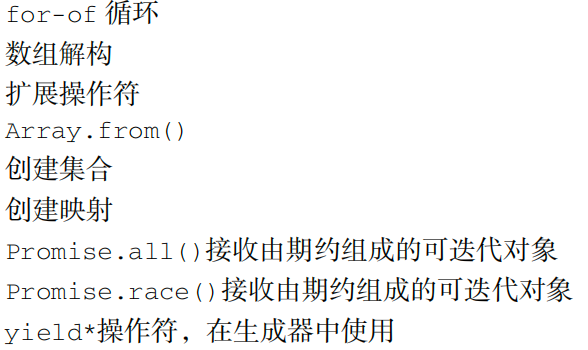
特殊:Array.form 可接受无迭代器工厂函数的类数组对象
迭代器不与可迭代对象某个快照绑定,意味着迭代时改变对象,迭代结果会受影响,而迭代器内部维护着对可迭代对象的引用,也就会阻止垃圾回收
提前关闭迭代
原生的迭代器都不能提前关闭,下一次迭代任然继续上一次。自定义迭代器关闭:定义 return 方法执行并返回 { done: true }
const arr = [1, 2, 3, 4, 5]
const iter = arr[Symbol.iterator]()
iter.return = function () {
  console.log('arr iter return')
  return { done: true }
}
for (const item of iter) {
  if (item > 3) {
    break // return执行了,但是并没有终止
  }
  console.log(item) // 1 2 3 arr iter return
}
for (const i of iter) {
  // 这次会继续上次的迭代
  console.log(i) // 5
}

/**
 * ---- 自定义迭代器提前终止
 */
class iterator {
  constructor(counter) {
    this.counter = counter
  }
  [Symbol.iterator]() {
    let idx = 1, counter = this.counter
    return {
      next() {
        if (idx <= counter) {
          return { done: false, value: idx++ }
        } else {
          return { done: true, value: undefined }
        }
      },
      return() {
        console.log('my iter return')
        return { done: true }
      }
    }
  }
}
const iter2 = new iterator(5)
for (const value of iter2) {
  if (value > 3) {
    break // 迭代器提前终止
  }
  console.log(value) // 1 2 3 my iter return
}
for (const value of iter2) {
  // 这次会调用工厂函数产生不同的迭代器实例,重新开始迭代
  console.log(value) // 1 2 3 4 5
}
生成器
介绍
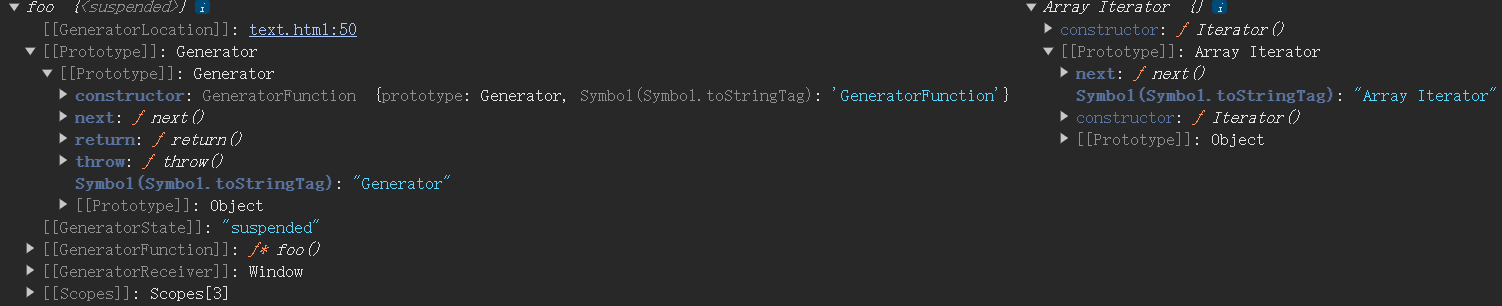
生成器也满足可迭代协议,且比迭代器更加细致灵活
function* foo () {
  yield 1;
  yield 2;
}
const g = foo() // 生成器函数生成生成器
console.log(g, [1, 2][Symbol.iterator]())
使用
// 生成器对象当做可迭代对象
function* func() {
    yield 1
    yield 2
    yield 3
}
const g = func()

for (const i of g) {
    console.log(i) // 1 2 3
}
yield 的输入输出
// yield 输入输出 ① 暂时:第一次 next 并不会执行第一个 yield 所在语句,但是会返回 yield 表达式的值
function* func(n) {
    console.log(n)
    console.log('@', yield 1)
    console.log('@@', yield 2)
    console.log('@@@', yield 3)
}
const g = func('X') // 生成生成器,不执行函数体
// next 传值会成为 yield 关键字的返回值,而不是 yield 后表达式的值
// 第一次调用 next 的参数会被忽略,可以理解为 next 的传递参数是上一次暂停的 yield 关键字的回答,而第一次传参并回答不了任何一个 yield
console.log(
    g.next('A'), // {value: 1, done: false}         // 上面 log 输出 X
    g.next('B'), // {value: 2, done: false}         // 上面 log 输出 @ B
    g.next('C'), // {value: 3, done: false}         // 上面 log 输出 @@ C
    g.next('D')  // {value: undefined, done: true}  // 上面 log 输出 @@@ D
)

// yield 输入输出 ②
function* func(n) {
    yield yield 100
}
const g = func(1)
console.log(
    g.next(2), // 同一行最右边那个 yield 100 执行,返回 {value: 100, done: false}
    g.next(3), // {value: 3, done: false} (第一次表达式的值丢弃,传递参数 3 为上一次暂停的回答,即上次 yield 关键字返回值)
)

// yield 输入输出 ③
function* func(n) {
    return yield 1
}
const g = func('X') // 生成生成器,不执行函数体,也就不关 return 的事
console.log(
    g.next('A'), // {value: 1, done: false}
    g.next('B'), // {value: B, done: true}
)
yield* 委托
// yield* 委托
function* func(n) {
    yield 1
    yield* [2, 3]
    yield 4
}
const g = func()
// yield* [2, 3]将等价与 yield 2; yield 3;
// 这种行为叫委托:yield* 委托给另一个可迭代对象
console.log(
    g.next(), // {value: 1, done: false}
    g.next(), // {value: 2, done: false}
    g.next(), // {value: 3, done: false}
    g.next(), // {value: 4, done: false}
    g.next(), // {value: undefined, done: true}
)

// yield* 关键字返回的值
// 关联的迭代器 done 为 true 的 value 值
// 关联的生成器函数:函数返回值

// 实现递归 -- yield* 不会暂停
function* nTimes(n) {
    console.log('@@@')
    if (n > 0) {
        yield* nTimes(n - 1);
        yield n - 1; // 返回的值来自这里,也就是说 yield* 不会暂停
    }
}
for (const x of nTimes(3)) {
    console.log(x);
}
// @@@ * 4
// 0 1 2
yield* 并不会暂停,只能委托给可迭代对象
提前关闭和终止生成器
每个生成器对象都有 return 方法 和 throw 方法
不同的是,return 肯定终止且关闭生成器,throw 如果在内部处理错误那么只能终止不能关闭
不能关闭指的是下一次 .next(),会继续上次的位置开始
场景:斐波那契额数列,第一次我要前4位,第二次我继续要5位...
对比迭代器与生成器
- 生成器比迭代器更加灵活,从 生成器=>介绍 的打印结果可得出
- 原生迭代器不可提前终止,自定义可以。生成器可以提前终止
参考:https://zh.javascript.info/generators
第八章,对象,类,面向对象编程
散碎
计算属性也是不能回滚的
let person = {
  [表达式1]: '',
  [表达式2]: ''
}
// 如果表达式2出错,那之前成功的1不能回滚
计算属性定义方法
let person = {
  [methodKey](name) {
  	console.log(`My name is ${name}`);
  }
}
类中定义方法的不同
class Person {
  say(){
    // 执行时确定 this,且此方法放在 Person 原型上
  }
  say = () => {
    // 定义时决定 this 后续不管谁调用,怎么赋值,this 始终为定义时
  }
  say = function() {
    // 执行时决定 this ,且属于类自身方法
  }
}
数据属性描述符与访问属性描述符
definedProperty / defineProperties / getOwnPropertyDescriptor / getOwnPropertyDescriptors
// 第一种用法
const person = {}
Object.defineProperty(person, 'name', {
  // 可否配置
  configurable: true,
  // 可否修改
  writable: true,
  // 可否遍历
  enumerable: true,
  // 值
  value: 'xz'
})

// 第二种 访问器属性
const car = {
  brand: 'benz'
}
Object.defineProperty(car, 'flex', {
  get() {
    return this.brand + '-big'
  },
  set(newVal) {
    console.log(newVal) // new
  }
})
car.flex = 'new'
console.log(car.flex) // 'benz-big'

// 第三种 定义多个属性
const plural = {}
Object.defineProperties(plural, {
  v1: {
    configurable: true,
    writable: true,
    enumerable: true,
    value: 'xz'
  },
  v2: {
    get() {
      return 0
    },
    set(newVal) {
      // code
    }
  }
})

// 获取属性描述符 getOwnPropertyDescriptor getOwnPropertyDescriptors
const obj = {}
Object.defineProperties(obj,{
  name:{
    configurable:true
  },
  age:{
    get(){
      return 19
    }
  }
})
const descriptor = Object.getOwnPropertyDescriptor(obj, 'name')
const descriptors = Object.getOwnPropertyDescriptors(obj)
console.log(
  descriptor, // {configurable: true}
  descriptors // {name: {con...}, age: {get...}}
)
四个数据属性默认值为 false
configurable 为 false 后不能更改回来
访问器属性 get 或 set 不能与数据属性 value 或 writable 同时配置
使用字面量形式定义访问器属性
// 使用字面量形式定义访问器属性
const person = {
  get name(){
    console.log('you get it')
    return 'xz'
  },
  set name(newV){
    console.log(`you set it = ${newV}`)
  }
}
person.name = 'new name'
console.log(person.name)
// you set it = new name
// you get it
// xz
Object.assign(对象合并,浅拷贝)(不回滚)
// 其他都不说了,就说说不回滚
const person = {
    name: 'xz',
    age: 19
}
const car = {
    brand: 'Benz',
    get width(){
        return 'width'
    },
    get height(){
        throw 'some err'
    }
}
try {
    Object.assign(person, car)
} catch (error) {}

console.log(person)
// {name: 'xz', age: 19, brand: 'Benz', width: 'width'}
即已经做出的修改无法撤销
Object.is (抹平比较差异)
console.log(
    +0 === 0,
    -0 === 0,
    +0 === -0,
    NaN === NaN
)
console.log(
    Object.is(+0, 0),
    Object.is(-0, 0),
    Object.is(+0, -0),
    Object.is(NaN, NaN),
)
//true true  true  false
//true false false true
原型
原型模式
function Person() {}
const person = new Person()
解释上述代码即可了解原型模式
- function 创建一个函数,并将其
**prototype** 指向一个对象,这个对象长这样
{
	constructor: Person,
  __proto__: Object.prototype
}
- 关键是创建 person 实例,new 会创建一个 person 并将其
**__proto__**** **指向 Person.prototype
所以最后 实例 person 与构造函数 Person 并没有直接联系
各种关于原型的方法以及遍历键的方法
实现继承
原型链实现继承
function Person(){}
function Kid(){}
Person.prototype.say = function(){
    console.log('I am person')
}

Kid.prototype = new Person()
const kid = new Kid()

kid.say() // I am person

console.log(kid.constructor) // Person
缺点:无法继承父类型属性 - 无法传参给父类型 - 父类型的引用值会在所有实例之间共享
盗用构造函数(对象伪装)(经典继承)
function Person(name) {
  this.name = name || "person";
}
function Kid(name) {
  Person.call(this,name);
}
const kid = new Kid('xz');
console.log(kid);
缺点:无法继承父类型原型属性
组合继承(原型链 + 盗用构造函数)
function Person(name) {
  this.name = name || "person";
}
Person.prototype.say = () => {
  console.log("person-proto-say");
};
function Kid(name) {
  Person.call(this, name);
}
Kid.prototype = new Person();
const kid = new Kid("xz");
kid.say();
console.log(kid);
缺点:效率慢,因为Person执行两次
原型式继承(Object.create)
const Person = {
  name: "person"
};
// Object.create大致实现
function create(proto) {
  function Kid() {}
  Kid.prototype = proto;
  return new Kid();
}
const kid = create(Person);
寄生式继承
寄生组合式继承(最佳范式)
function Person() {}
Person.prototype.say = () => {
  console.log("person");
};
function inherit(child, person) {
  let proto = Object.create(person.prototype);
  proto.constructor = child;
  child.prototype = proto;
}
function Kid() {}
inherit(Kid, Person);
const kid = new Kid();
kid.say();
类
散碎
typeof (class) 为 function
构造函数返回值
若构造函数返回非空对象,则 new 出来的就是返回的对象
若不返回,那 new 出来的就是 this
function Foo 构造函数亦是如此
语法
class Person extend Main{
  constructor() {
    // super 相当于 Main,且只能在派生类及静态方法中可用
    super()
  }
  [Symbol()] = ''
  [1 + 2] = ''
  static self(){}
  // 还可以定义生成器方法 略
}
let Boss = class extend Person {}
派生类如果有构造函数必须调用 super
构造函数后于其他属性及方法定义执行
class Boss extends Person {
  constructor() {
    super();
    console.log(this.name, this.fun, this.foo); // 完美打印
  }
  name = 'xz';
  fun() {}
  foo = function () {};
}